Step 10 of 10
Congratulations! If you've made it this far, you have successfully signed up for a domain name and webhosting. Kudos for taking the initiative. Now, it's my turn to take over. Shortly after placing your oder, you'll receive two emails. The first will be titled "hostgator order" and will confirm that you just placed your order. The second email titled "Your Hostgator Account Information" should arrive about 20 minutes after the first email. This second email contains your important account information and will look fairly similar to this.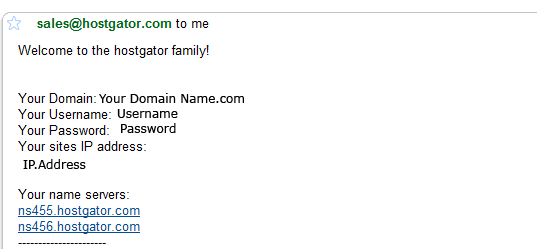
Forward this email to Steve@IveTriedThat.com. I know it contains your username and password, but I need that information to access your account to setup your blog. Once you forward me this email, I'll be able to begin working on getting your blog setup.
In the meantime, you'll need to pick out a theme to use for your blog. Here are a few places to get you started:
100 Free High-Quality Themes
WordPress.org Theme Directory
WordPress Themeland
ThemeForest - The themes here aren't free, but they are of higher quality.
WordPress.org Theme Directory
WordPress Themeland
ThemeForest - The themes here aren't free, but they are of higher quality.
Once you've selected the design for your blog send your choice to Steve@IveTriedThat.com and I'll install it on to your new blog.
That's all you need to do! Thanks for signing up! I'll be in touch via email.